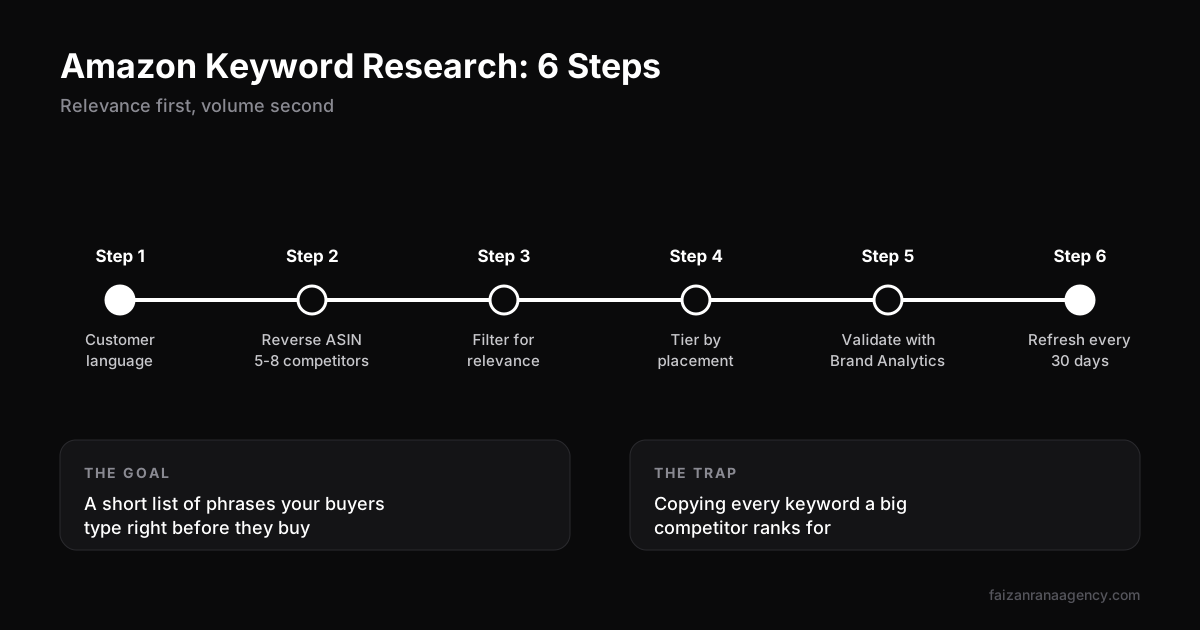
Short answer: Amazon keyword research means finding the exact phrases shoppers type before they buy your type of product, then placing them where Amazon's algorithm reads them. Start with customer language, mine competitor ASINs with a reverse ASIN tool, filter for relevance and conversion (not just volume), tier keywords into title, bullets and backend, and validate with Brand Analytics data every 30 days.
In this article
- Why copying competitor keywords fails
- Step 1: Start with customer language
- Step 2: Reverse ASIN your top competitors
- Step 3: Filter for relevance, not volume
- Step 4: Tier your keywords by placement
- Step 5: Validate with Amazon's own data
- Step 6: Track and refresh every 30 days
- Amazon keyword research tools compared
- FAQ
A listing can have great photos, fair pricing and solid reviews and still sit on page three. When we audit those listings, the cause is usually the same: the main keyword is wrong. Not badly written. Wrong. The seller picked the phrase with the biggest number next to it, and that phrase was never what their buyers actually search.
Good Amazon keyword research fixes that before you spend a dollar on ads. It also makes every other part of a launch cheaper, because PPC, listing copy and ranking all run on the same keyword list. Here is the process our Amazon listing optimization team runs for every new product.
Why copying competitor keywords fails
Most sellers start by pasting a competitor's ASIN into a tool, exporting every keyword it ranks for and stuffing the list into their listing. It feels thorough. It rarely works, for three reasons:
- The competitor ranks because of sales history, not keywords. A big seller can rank for loosely related terms. A new listing cannot.
- Volume is not intent. "Water bottle" has huge volume, but someone selling a 2-litre gym jug converts far better on "half gallon water bottle with straw".
- Irrelevant clicks hurt you. If shoppers click and don't buy, your conversion rate drops, and Amazon shows you less. We explain why in how Amazon's ranking algorithm works.
So the goal is not the biggest list. It is the most relevant list, ranked by how likely each phrase is to turn into a sale.
Step 1: Start with customer language
Before opening any tool, spend 30 minutes reading what buyers write. You are collecting the words they use, not the words your supplier uses.
- Read 1 to 3-star reviews on the top 10 competitors. Note the problems and the words people use to describe them.
- Read the questions section on those listings.
- Type your product into Amazon's search bar and write down the autocomplete suggestions. Repeat with "a", "b", "c" after the main word.
- Check Reddit threads and TikTok comments in your niche for how real people describe the product.
This gives you a seed list of 15 to 30 phrases. It will be messy. That's fine.
Step 2: Reverse ASIN your top competitors
Now use a tool. A reverse ASIN lookup shows the keywords a listing ranks for and roughly how much traffic each one sends. Run it on 5 to 8 competitors, not just the biggest one. Include a couple of newer listings that are growing fast, because they show you what is winning right now.
Export everything into one sheet. Then remove duplicates and anything with a competitor's brand name. Using another brand's name in your listing is against Amazon policy and a quick way to get flagged.
Step 3: Filter for relevance, not volume
This is where most of the value comes from. Go through the sheet and score every keyword on three things:
- Relevance (1 to 3). Would a buyer typing this be happy to see your exact product? A 3 means yes, without hesitation.
- Conversion signal. Long, specific phrases ("stainless steel ice cream scoop for hard ice cream") usually convert better than short, broad ones.
- Competition. How many strong listings already dominate page one? A new listing should target phrases where page one is beatable.
Drop every keyword with a relevance score of 1. You will usually end up with 40 to 80 keywords from a list that started at several hundred.
Step 4: Tier your keywords by placement
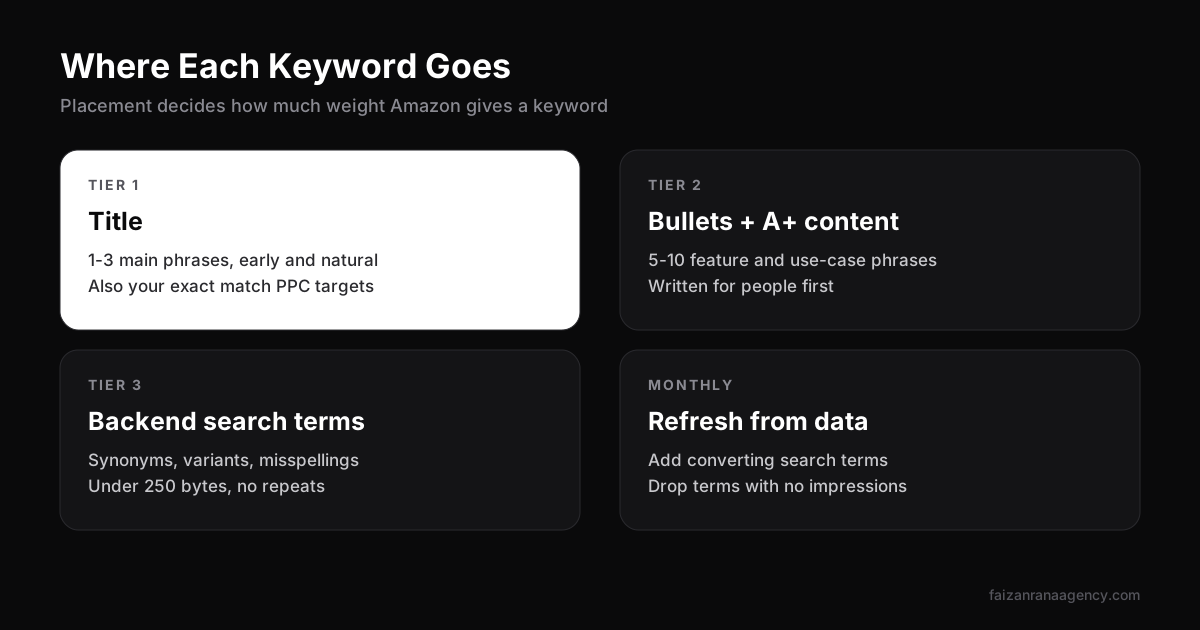
Amazon weighs where a keyword appears. The title matters most, then bullets and description, then backend search terms. So we sort the filtered list into tiers:
| Tier | Where it goes | What qualifies |
|---|---|---|
| Tier 1 (1 to 3 phrases) | Title, early and naturally | Highest relevance and strong volume; your main ranking target |
| Tier 2 (5 to 10 phrases) | Bullets and A+ content | Feature and use-case phrases buyers search |
| Tier 3 (the rest) | Backend search terms | Synonyms, spelling variants, other-language terms; under 250 bytes, no repeats, no commas needed |
Write for people first. A title that reads like a keyword list may still get indexed, but it loses clicks, and clicks drive ranking. The same keyword list then becomes your PPC targeting. Tier 1 goes into your exact match campaign; Tier 2 and 3 go into phrase and broad. If ad costs climb, revisit this list first, as we explain in why your Amazon ACoS is too high.
Step 5: Validate with Amazon's own data
Third-party tools estimate. Amazon measures. If you have Brand Registry, two reports are worth checking every month:
- Brand Analytics: Search Query Performance. Shows impressions, clicks, add-to-carts and purchases for the search terms that brought shoppers to your products. If a keyword gets impressions but no clicks, your main image or price is the problem.
- Your PPC search term report. Shows the exact phrases people typed before buying. Converting terms you did not have on your list go straight into the listing and an exact match campaign.
After 30 days of ad data, your keyword list stops being a guess. It becomes evidence.
Step 6: Track and refresh every 30 days
Keyword demand moves with seasons, trends and new competitors. Track organic rank for your Tier 1 and Tier 2 phrases weekly, and review the full list monthly:
- Add new converting search terms from your ad reports.
- Remove backend terms that never get impressions.
- Check whether a rising phrase deserves a place in the title.
Change one thing at a time and give it two weeks. Otherwise you can't tell what moved the needle.
Amazon keyword research tools compared
You don't need every tool. Most sellers need one paid tool plus Amazon's free data.
| Tool | Best for | Cost |
|---|---|---|
| Amazon search bar (autocomplete) | Real shopper phrases, seed ideas | Free |
| Brand Analytics (Search Query Performance) | Real impressions, clicks and purchases for your terms | Free with Brand Registry |
| PPC search term report | Exact converting phrases | Comes with ad spend |
| Helium 10 (Cerebro, Magnet) | Reverse ASIN and keyword expansion | Paid |
| Jungle Scout (Keyword Scout) | Keyword volume and product research | Paid |
Whatever tool you use, the process above matters more than the tool. A good process with free data beats a bad process with expensive software.
Keyword research is step one of any launch. If you are planning a new product, read our full Amazon product launch playbook next, so the keyword list feeds straight into your listing and launch ads.
FAQ
What is Amazon keyword research?
It is the process of finding the search phrases shoppers use on Amazon before buying your type of product, then placing those phrases in your title, bullets, backend search terms and PPC campaigns.
How do I do Amazon keyword research for free?
Use Amazon's search bar autocomplete, read competitor reviews and questions, and, if you have Brand Registry, use Brand Analytics. Your PPC search term report is also free once ads are running.
How many keywords should I use in my Amazon listing?
Focus on 1 to 3 main phrases in the title, 5 to 10 supporting phrases in bullets and A+ content, and fill the backend search terms with synonyms and variants under 250 bytes.
What is the best Amazon keyword research tool?
Helium 10 and Jungle Scout are the most common paid tools. Combined with Brand Analytics and your search term report, either is enough for most sellers.
How often should I update my Amazon keywords?
Track rank weekly and review the full keyword list every 30 days, adding converting terms from ad reports and removing terms that get no impressions.
If you would rather have a team build and maintain your keyword strategy, get in touch and we'll look at your listing.
Want us to do this for your brand?
Book a 30-minute call and we will scope your project.