Short answer: The best way to use AI in e-commerce is in phases, not all at once. First clean up your product, sales and customer data. Then take quick wins like AI-drafted content and support replies. Next, connect workflows such as ads, inventory and forecasting. Only then hand bigger tasks to AI agents, with clear limits. Measure every phase in hours saved, cost per acquisition and stockouts, not in how many tools you bought.
In this article
A common pattern: a brand signs up for four AI tools in a month, gets excited, and three months later uses none of them. The tools weren't bad. The data underneath was messy, nobody owned the rollout, and nobody measured the result.
This roadmap is built for growing brands, roughly $1M to $20M in sales, not for corporations with data teams. It's the order we recommend when clients ask us how to use AI in e-commerce without wasting money.
Why most AI projects in e-commerce stall
- Bad inputs. AI working from incomplete product data or messy ad accounts produces confident, wrong output.
- No owner. "Everyone should try AI" means no one is accountable for results.
- No baseline. If you didn't measure how long a task took before, you can't prove AI saved time.
- Starting with the riskiest tasks. Letting AI change budgets or prices before it has handled anything simpler.
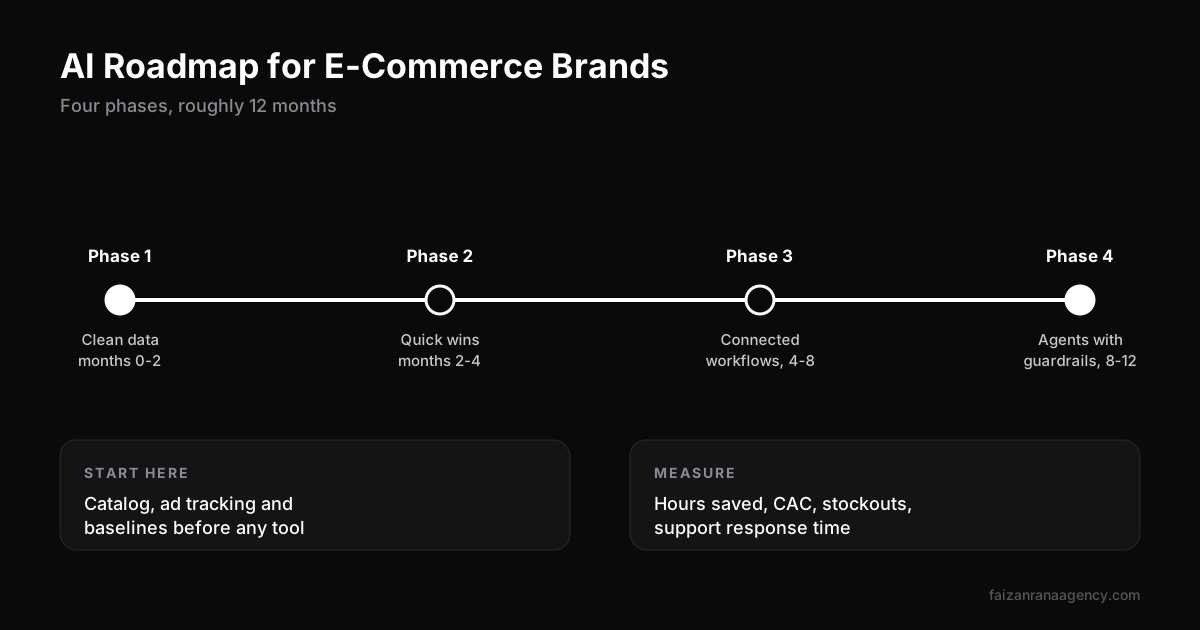
Phase 1: Clean data (months 0 to 2)
This is the boring phase, and the one that decides everything else. Every AI tool you add later reads from this data.
- Product catalog: one source of truth for titles, specs, attributes, images and prices across Shopify, Amazon and other channels.
- Ad accounts: clean campaign naming and structure, and working conversion tracking. If your Amazon ads are messy, start with fixing a high ACoS.
- Customer data: deduplicated contacts with clear marketing consent.
- Baselines: record how long key tasks take today, such as writing a listing, answering a ticket or building a weekly report.
Owner: operations lead. KPI: catalog completeness and tracking accuracy.
Phase 2: Quick wins (months 2 to 4)
Pick tasks that are frequent, low-risk and easy to check:
- Drafting product descriptions, listing bullets and A+ content (always edited by a person).
- Generating ad copy and creative variations for testing.
- Drafting replies to common support questions.
- Weekly performance summaries from ad and sales data.
Owner: marketing and support leads. KPI: hours saved per week against the Phase 1 baseline.
Phase 3: Connected workflows (months 4 to 8)
Now connect systems so AI works across them instead of in one tool at a time:
- Inventory forecasting that combines sales from every channel with supplier lead times.
- Ad performance alerts that flag wasted spend or creative fatigue automatically. Faster creative testing is where this pays off most, as we explain in Facebook ads for e-commerce.
- Support connected to order and shipping data, so answers are specific, not generic.
Owner: operations plus an agency or technical partner. KPI: stockout days, cost per acquisition, first-response time.
Phase 4: Agents with guardrails (months 8 to 12)
Only now let AI agents take actions on their own, inside clear limits:
- Spending caps and approval steps for any budget or price change.
- A log of every action the agent takes.
- Automatic handoff to a person for unusual or high-value cases.
This is also when to prepare for agentic shopping, where AI assistants research and buy for customers. We cover what's already happening in AI agents for e-commerce.
AI in e-commerce examples by team
| Team | Example use | Phase |
|---|---|---|
| Marketplace (Amazon, Walmart) | Listing drafts, keyword clustering, review analysis | 2 |
| Paid ads | Copy variations, performance summaries, waste alerts | 2 to 3 |
| Creative | Script drafts, image variations for testing | 2 |
| Customer support | Drafted replies, order-status automation | 2 to 3 |
| Operations | Demand forecasting, reorder suggestions | 3 |
| Leadership | Weekly business summaries across channels | 2 |
How to measure AI ROI
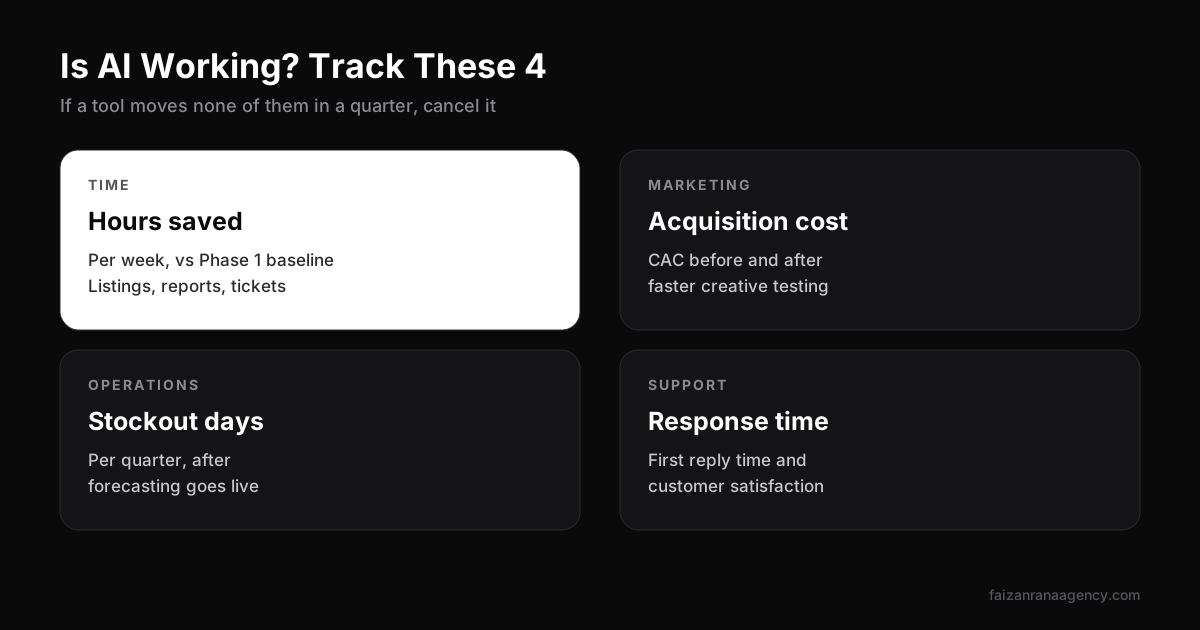
- Hours saved per week on tasks you baselined in Phase 1.
- Customer acquisition cost before and after faster creative testing.
- Stockout days per quarter after forecasting goes live.
- Support response time and customer satisfaction.
If a tool doesn't move one of these within a quarter, cancel it.
Risks to plan for
- Privacy: only feed customer data into tools with clear data agreements, and respect marketing consent.
- Brand voice: AI drafts drift toward generic. Keep a short voice guide and a human editor.
- Marketplace rules: Amazon and other marketplaces have strict policies on listings and reviews. AI doesn't know your account's history. A person must approve changes.
- Accuracy: AI can state wrong specs confidently. Always check facts before publishing.
FAQ
How can AI be used in e-commerce?
Common uses include drafting product content, generating ad variations, answering support questions, forecasting inventory, summarising performance and, increasingly, AI agents that complete tasks with human approval.
Where should a small e-commerce brand start with AI?
Start by cleaning product and ad data, then use AI for low-risk, frequent tasks like content drafts and weekly reports before automating anything that spends money.
How long does it take to implement AI in an e-commerce business?
A phased rollout typically takes around 12 months, from data clean-up through quick wins and connected workflows to agents with guardrails.
What are examples of generative AI in e-commerce?
Product description drafts, ad copy and image variations, support reply drafts, review summaries and personalised product recommendations.
How do I measure ROI from AI in e-commerce?
Track hours saved against a baseline, customer acquisition cost, stockout days and support response times. Cancel tools that don't move these within a quarter.
Want help building an AI roadmap that fits your team and budget? Talk to us, or see our full range of e-commerce services.
Want us to do this for your brand?
Book a 30-minute call and we will scope your project.