Short answer: A successful Amazon product launch runs on a 90-day plan, not a launch day. Validate the margin before you order, get Brand Registry in place, go live with a finished listing, use PPC to buy relevance for a small set of keywords, and collect your first reviews through Amazon-approved programs only. Then judge the launch on day 30, 60 and 90 numbers, not on the first week.
In this article
- Why most Amazon product launches stall
- Before day 0: validate the numbers
- Source with quality checks built in
- Brand Registry and approvals
- Build a listing that is finished on day one
- Launch PPC: buy relevance, not sales
- Your first 30 reviews, the safe way
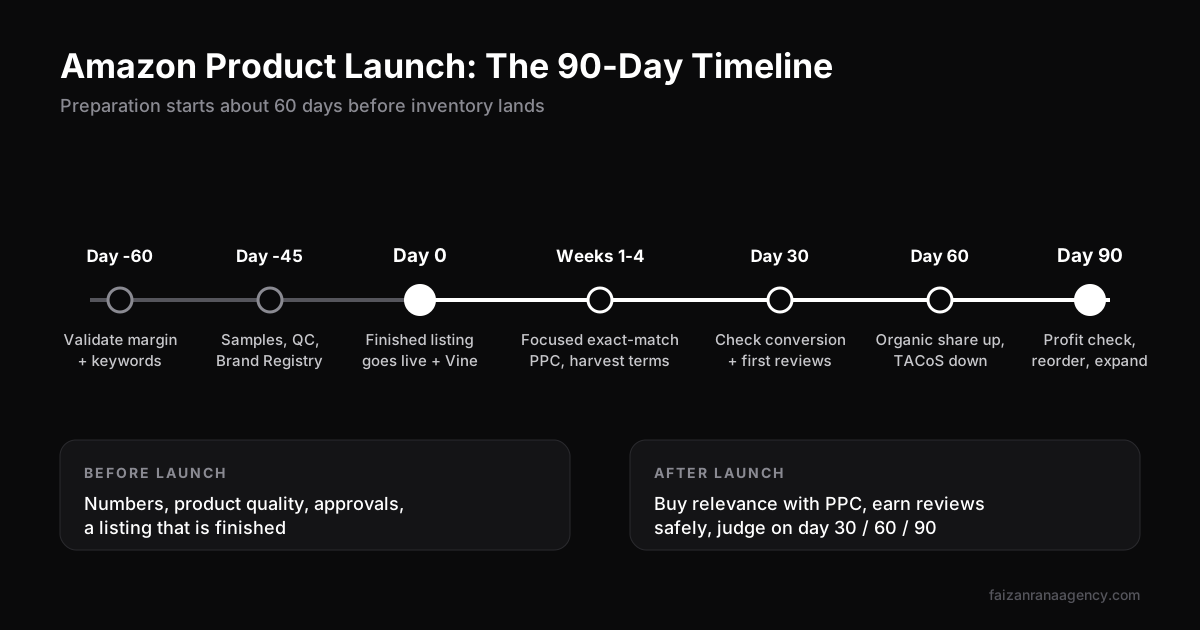
- The 90-day checkpoints
- Mistakes we still see every month
- FAQ
Every new client asks some version of the same question on the first call: "How do we launch this thing on Amazon without burning the budget?" Most of them have already watched a product go live, sell a handful of units, and then sink to page five.
The problem is almost never the launch week. It is the six weeks before it. Sellers rush validation, accept the first supplier quote, publish a half-done listing "to get started", and then try to fix everything with ad spend. That is the expensive order.
This is the order our Amazon account management team follows for every brand we take live. It is not complicated. It is just strict about sequence.
Why most Amazon product launches stall
When a launch fails, it usually fails for one of three reasons. We see them in almost every account audit.
- The margin never worked. The product looked profitable at full price with zero ad spend. Once you add realistic PPC costs, returns and storage, there is nothing left.
- The listing went live unfinished. Placeholder images, a keyword-stuffed title and no A+ content. Every click you pay for converts badly, so Amazon learns your product is not worth showing.
- Ads were aimed at too many keywords. A new listing has no sales history. Spreading budget across 200 keywords means you never become relevant for any of them.
Fix those three and most launches stop being a gamble.
Before day 0: validate the numbers
We start roughly 60 days before inventory lands. Pull the top 10 listings for your main search term and write down their price, review count, rating and estimated monthly sales. You are looking for a gap: a price band, a feature, or a quality complaint in the 1 to 3-star reviews that you can fix.
Then do the math with launch-level ad spend, not "steady state" ad spend. During the first 60 days your ACoS will be high. That is normal. The question is whether the product can survive it.
| Line item (illustrative $29.99 product) | Per unit |
|---|---|
| Selling price | $29.99 |
| Amazon referral fee (15% in most categories) | -$4.50 |
| FBA fulfilment fee (check the FBA calculator for your size tier) | approx. -$5.50 |
| Landed product cost (unit + freight + duty) | -$7.00 |
| Launch PPC cost per unit sold (at ~40% ACoS on ad sales) | -$8.00 |
| Launch-phase profit per unit | approx. $5.00 |
If that bottom line is negative during launch, you either need a better landed cost, a higher price point, or a different product. Kill it now, not after 1,000 units are sitting in a fulfilment centre. Use Amazon's own FBA Revenue Calculator for the real fee numbers in your category.
This is also the stage to do proper keyword work. Your title, bullets and PPC all depend on it, so we walk through it in detail in our Amazon keyword research process.
Source with quality checks built in
The cheapest supplier is rarely the cheapest supplier. A bad first batch shows up as returns, "arrived broken" reviews and a damaged account health score. All of that hurts ranking far more than a slightly higher unit cost.
- Order samples from at least three suppliers. Use them like a customer would. Drop them, wash them, leave them in a hot car.
- Write a one-page spec sheet. Materials, dimensions, colour codes, packaging and labelling. Send the same sheet to every supplier so quotes are comparable.
- Pay for a pre-shipment inspection on the first bulk order. It costs a few hundred dollars and catches problems before they become reviews.
- Plan packaging for FBA. Box dimensions decide your size tier, and your size tier decides your fulfilment fee. A few centimetres can change margin.
Brand Registry and approvals
Do not launch without Amazon Brand Registry if you can avoid it. It requires a registered or pending trademark, and it unlocks the tools a launch depends on: A+ content, Sponsored Brands ads, Brand Analytics, Vine and better protection against hijackers.
Some categories and brands also need approval before you can list at all. If you are in a gated category, start that process early. Our team handles brand and category approvals for exactly this reason: it is the step most likely to delay a launch date.
Build a listing that is finished on day one
Your listing is the landing page for every dollar of ad spend. If it is not finished, do not go live. Here is what "finished" means to us:
- Main image on a pure white background, product filling most of the frame, no text or badges.
- All secondary image slots used: lifestyle, scale (in a hand or next to a known object), features, dimensions, what is in the box, and a comparison image.
- Title that leads with the brand and the main keyword, then the one or two attributes buyers filter by. Readable first, keyword-rich second.
- Five bullets that each answer a buying objection. Pull these straight from competitor 1 to 3-star reviews.
- Backend search terms filled with synonyms and misspellings, no repeats, within the 250-byte limit.
- A+ content that tells the brand story and answers the remaining questions.
Amazon's search has also become more conversational with its AI shopping assistant, Rufus. Listings that clearly answer "who is this for" and "how is it different" now have an edge. We cover what that means for ranking in how Amazon's ranking algorithm works today.
Launch PPC: buy relevance, not sales
In the first four weeks, PPC has one job: prove to Amazon that your listing converts for a small group of relevant keywords. Profit comes later. That mindset changes how you build campaigns.
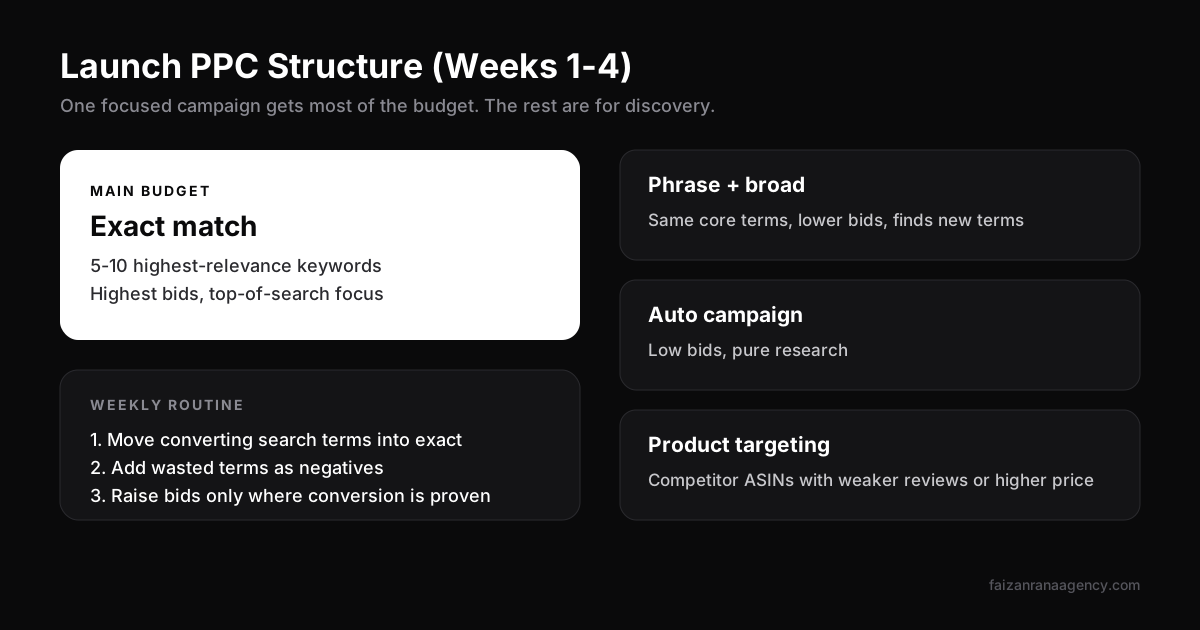
The structure we use for weeks 1 to 4
- Exact match campaign with 5 to 10 high-relevance keywords. This gets most of the budget and the highest bids.
- Phrase and broad campaign with the same core terms, at lower bids, to discover new search terms.
- Auto campaign at low bids, purely for research.
- Product targeting campaign aimed at competitor listings with weaker reviews or higher prices.
Every week, move converting search terms from auto and broad into exact, and add non-converting terms as negatives. That one habit keeps launch spend under control.
Expect ACoS to be high at first. If it stays high after week six, the cause is usually one of four things. We break them down in why your Amazon ACoS is too high.
External traffic helps too. Sending buyers from Meta or Google to your listing can lift sales velocity, and brand-registered sellers may qualify for Amazon's Brand Referral Bonus. If you are considering it, read why Meta Ads still work for e-commerce first.
Your first 30 reviews, the safe way
Reviews decide conversion rate, and conversion rate decides ranking. But this is the part of an Amazon product launch where sellers get accounts suspended. Keep it boring and within the rules:
- Amazon Vine. Available to brand-registered sellers. Vine Voices receive the product and leave honest reviews. Enrol before or right at launch.
- The "Request a Review" button in Seller Central, or an approved automation tool that uses it.
- Neutral product inserts. You can include setup tips and support contacts. You cannot ask for a positive review or offer anything in exchange for one.
What not to do: no review groups, no "review for refund" deals, no asking friends and family. Amazon's detection is very good now, and the penalty is far worse than a slow start.
The 90-day checkpoints
Do not judge a launch on week one. Judge it on these three checkpoints.
| Checkpoint | What to look at | Healthy sign |
|---|---|---|
| Day 30 | Unit session percentage (conversion rate), first reviews, organic rank for top 5 exact keywords | Conversion near or above category average; moving onto page 1 for at least 1 to 2 keywords |
| Day 60 | Organic vs ad sales split, TACoS trend, review count and rating | Organic share rising each week; TACoS falling |
| Day 90 | Profit per unit after ads, inventory sell-through, keyword expansion | Profitable at current spend; ready to reorder and widen targeting |
If day 60 shows organic sales still flat, go back to the listing before you raise bids. More budget rarely fixes a conversion problem.
Mistakes we still see every month
- Launching with too little stock. Running out of inventory in week three throws away all the ranking you paid for.
- Changing the listing every few days. Give each change at least two weeks so you can see what it did.
- Discounting too deep. Heavy coupons can attract bargain hunters who return items and leave poor reviews.
- Ignoring other channels completely. Amazon is a great first channel, but not the only one. If you are weighing that choice, see Shopify vs Amazon: where to sell first.
FAQ
How long does an Amazon product launch take?
Plan for about 60 days of preparation before inventory arrives and 90 days after going live. Most products need that full window to build reviews and stable organic rank.
How much budget do I need to launch a product on Amazon?
Apart from inventory, budget for launch PPC for the first 60 to 90 days, plus photography, Brand Registry trademark costs and Vine. The right ad budget depends on your category's cost per click, so estimate it from the keywords you plan to target.
Do I need Brand Registry to launch?
You can list without it, but you lose A+ content, Sponsored Brands, Vine and brand protection. For a serious launch, we treat it as required.
Is a high ACoS normal during launch?
Yes. In the first weeks you are paying to build relevance and sales history. What matters is that ACoS and TACoS trend down as organic sales grow.
Can I launch on Amazon and Shopify at the same time?
You can, but most brands do better launching on one channel first, then adding the second once operations are stable.
Every launch is different, but the order rarely changes: numbers, product, approvals, listing, ads, reviews. Get that sequence right and your ad spend works for you instead of against you. If you would like a team that has done this many times to run it with you, tell us about your product.
Want us to do this for your brand?
Book a 30-minute call and we will scope your project.